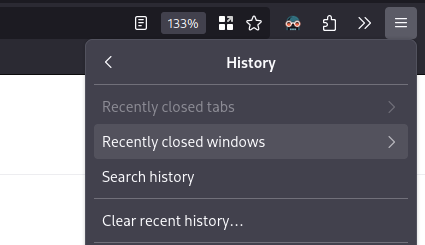

I generally have a “home” Firefox window with my most used tabs pinned. Sometimes I close it before another window, so I was frustrated to “lose” it and having to redo my pins. But recently I discovered this feature. Joy!
How would people function without knowing this?? Maybe I’m just young, but this has been a thing as far back as I can remember (maybe 2010 or so), on all browsers I’ve used (Safari, Chrome, Firefox).
It got removed from chrome a while ago. Have to use an extension for it.That’s terrible. I’m so sorry.
Command + Shift + T on mac os, and Ctrl + Shift + T for Windows
You’re welcome
Don’t forget Ctrl + Shift + N
Or Ctrl+Shift+P for Firefox
I’m not a fan of that shortcut though:
- Ctrl+T - open new tab; Ctrl+shift+T - reopen closed tab
- Ctrl+N - open new window; Ctrl+shift+N - reopen closed window
- Ctrl+P - print (or apparently preview on Lemmy); Ctrl+shift+P - private window?
It breaks the nice pattern.
Yeah it does break the pattern but there isn’t much of an option that keeps everything super clean like tjat, unless it’s something like ctrl alt N for a private window.
Yeah, I think that would be a better option, and then an eventual private tab would be intuitive too.
I save that one for secret fun time
deleted by creator
That’s last closed tab, not window.
Edit: actually it will reopen a window too if the last closed tab was on it.
I think that’s a fairly recent change, I remember reading it in the changelogs. There was also something else relating to the feature, but now I don’t remember
deleted by creator
CTRL+SHFT+
tWill reopen your last closed tab.
CTRL + SHIFT +
nFor a recently closed window.
niceee!!
Literally every browser has this feature, it’s not unique to Firefox.
Firefox didn’t have it for the longest time so a lot of people don’t know
deleted by creator
So we’re giving them props for something that’s been available on chrome for a decade?
No, we are letting people know it’s there
Shift+ctrl+T is usually the keyboard shortcut to bring back closed tabs Shift+ctrl+N is to bring back closed windows (doesn’t work on private browsing windows)
I’ve found that it does work in private sessions
I can still feel the pain when it’s 2 AM and you meant to Ctrl + Shift + T and you’re muscle memory leaks in and hits you with the Ctrl + Shift + W.
FYI there’s a confirm close option that will mitigate this terrible scenario, for anyone that’s been there before.
Or just Ctrl+shift+N will reopen that window. It has been there for years, perhaps more than a decade, and is the perfect companion to Ctrl+N, just like Ctrl+shift+T is the perfect companion to Ctrl+T.
As someone who frequently has windows with 1000+ tabs, this feature has saved my bacon countless times.
This makes me feel understood.
Who needs bookmarks anyways :')
I highly recommend Tab Session Manager if you’re a crazy person like me.
seconded, it’s great for resuming learning sessions and stuff like that.
Being able to jump back into all the troubleshooting and stack overflow tabs whenever a problem reappears is great.
itsa great extension for people with internet problems
thanks, didn’t know this one but seems highly helpful
Saved my ass many times.
Oh yeah this feature is a godsend
You can just press CTRL+SHIFT+T and CTRL+SHIFT+N continually to reopen closed tabs and windows, respectively, in the order they were closed.
ctrl+shift+t
I wish Firefox had a method to restore windows after a restart. Losing all my tabs across multiple windows due to work required updates is a huge pain.
This is literally a thing? You just go to options and tick General -> Startup -> Open previous windows and tabs. It is quite literally the first option in the interface. I only mean to be a slight bit rude, but did you not even take a cursory look through the options?
Don’t worry about being rude. Spreading demeaning misinformation about free software, especially one as important for the Web as Firefox, should be frowned upon.
Personally, I’d like it to be able to do it sometimes without having to set it to happen every time. In other words, I’d like a “restore previous session” UI element in the history interface.
I should probably look into some of the extensions folks in this thread are talking about.
There is a “recently closed windows” section in the history area. You can get all your tabs back.
I don’t understand this thread, this is exactly what I’m talking about in my OP.
I rely on this all too often…
It also persists through a reboot, so if you shutdown or reboot with tabs open, it will ask you to restore the previous session when you next start it after the boot.
If you didn’t restore it, but didn’t open any more tabs, you can close it again, reboot, etc, and this option will still work to get your tabs back when you’re ready.