

I want to get into Arch Linux, but I don’t have that much experience and I feel like it’ll be easier to set it up in a virtual machine rathen than dual booting, I’ve used Oracle VirtualBox before but it’s very laggy. Are there any other VMs that aren’t as laggy, or do I just have a hardware issue?
If your computer is a Linux, QEMU/KVM with libvirtd is great. If you run a Windows 10 or higher, HyperV works great, you should also be able to grab a VMware Player if it’s still free. For Mac you have Parallels I believe.
Gnome Boxes is also great for simple stuff on Linux. Besides there is virt-manager as GUI for libvirt. On macOS UTM is a good free and open source tool.
Sorry I meant virt-manager yeah, I think it is part of libvirtd
HyperV doesn’t let you adjust the screen size does it? I tried to use it for work but that held me back
I believe you need to install the drivers for it. Something similar to vmwaretools but for hyperv.
Oh okay, I couldn’t even find any screen settings, so I assumed it was just not possible. Thanks, I’ll look into it :)
I’ll try it
I’d say VirtualBox is still your best bet b/c of its well-polished user interface - ie unless you plan to play games.
very laggy
Had you installed “extension pack” & “guest additions”? If not, please do! They make a world of difference.
Grab them for the version you’ve installed from VirtualBox downloads directory. Install
Oracle_VM_VirtualBox_Extension_Pack-x.y.z.vbox-extpackon your machine andVBoxGuestAdditions_x.y.z.isoon your VM.For example, for version 7.0.10:
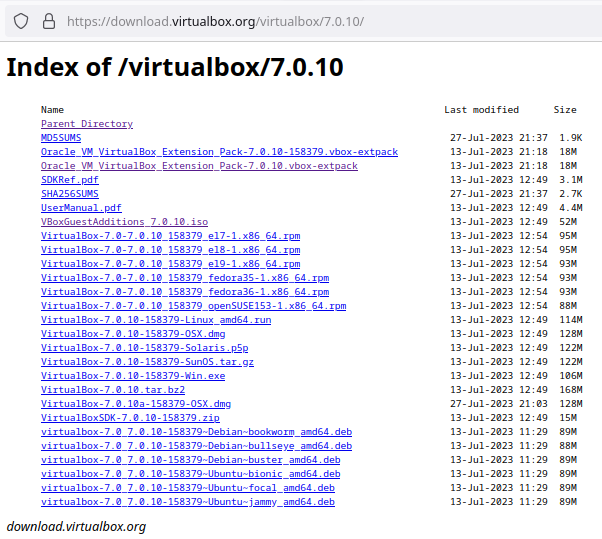
HTH
I’ve never tried the extension pack, but I do have the guest additions. How do you install it?
Here’s a decent guide on how to do it for an Ubuntu VM (instructions should apply to Arch too.) Since you’ll be manually downloading guest-additions, just skip the “prerequisites” section.
An here’s a guide on how to install the extension pack.
Pray, post here if you run into any troubles (you shouldn’t ✌️.)
Thank you! I’ll be back if I run into some trouble. :D
Desktop usage is almost always going to feel laggy in a VM because you don’t have a real GPU inside the VM and it will fallback to some non-accelerated framebuffer mode. There are some GPU virtualization solutions, for example QEMU has
virglthat offers 3D acceleration, but in my experience it’s buggy/not ready and doesn’t offer near bare metal performance.The only way to get near bare metal graphical performance in a VM is by using PCI pass through of an entire GPU, but that requires an extra GPU, is non-trivial to setup and comes with a lot of caveats.
Don’t worry, if he installs Arch from scratch, it will take him a long time before even having internet connection or installing X.
That’s just a meme. If you can follow some basic instructions, you can setup arch.
This. There’s archinstall now, too. A bit buggy in my experience so I prefer the old fashioned way.
Dunno why are people spreading this myth… Arch is not that hard to install and you don’t get a gold medal for installing it. I installed it with LXDE in an office machine, it only took me an hour.
It depends, I installed it from base, text mode, I had to edit some config file to add my network interface and systemctl restart network etc, then pacman to install X, Xfce, etc, by hand. I guess the best thing is to install Manjaro for instance, it takes a few minutes and you have full GUI and everything.
Fuck Manjaro. EndeavorOS ftw.
Here is an alternative Piped link(s): https://piped.video/watch?v=5KNK3e9ScPo
Piped is a privacy-respecting open-source alternative frontend to YouTube.
I’m open-source, check me out at GitHub.
Have you heard of our lord and savior chroot?